
How to Transfer a Domain to TechInHost
On this page
If you already own a domain registered elsewhere, you can transfer it to TechInHost to manage and renew it alongside your other services.
Before you start
You'll need your domain's EPP code (also called an auth code or transfer code), available from your current registrar. Your domain should also be unlocked at your current registrar and be at least 60 days past its last registration or transfer.
Starting a transfer
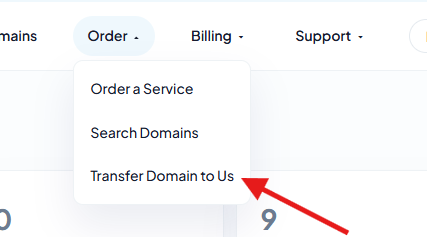
Step 1: Go to Transfer Domain to Us
Sign in to panel.techinhost.com and click Transfer Domain to Us from the menu.
Step 2: Enter your domain and EPP code
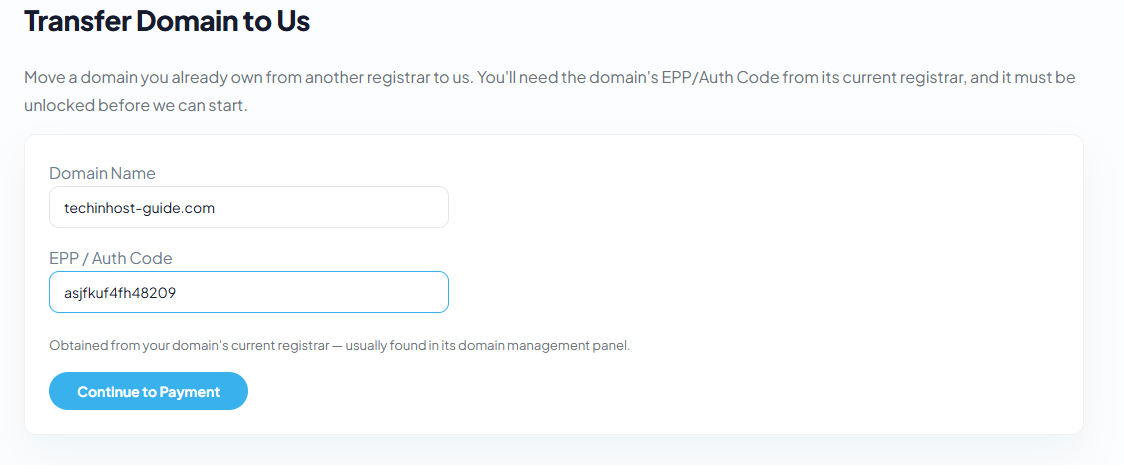
Type the domain name and paste in the EPP code from your current registrar.
Step 3: Complete checkout
Complete the checkout steps. You'll typically receive an email from your current registrar to approve the transfer, and the process usually completes within 5-7 days.
Did this answer your question?
Thanks, your feedback has been sent.